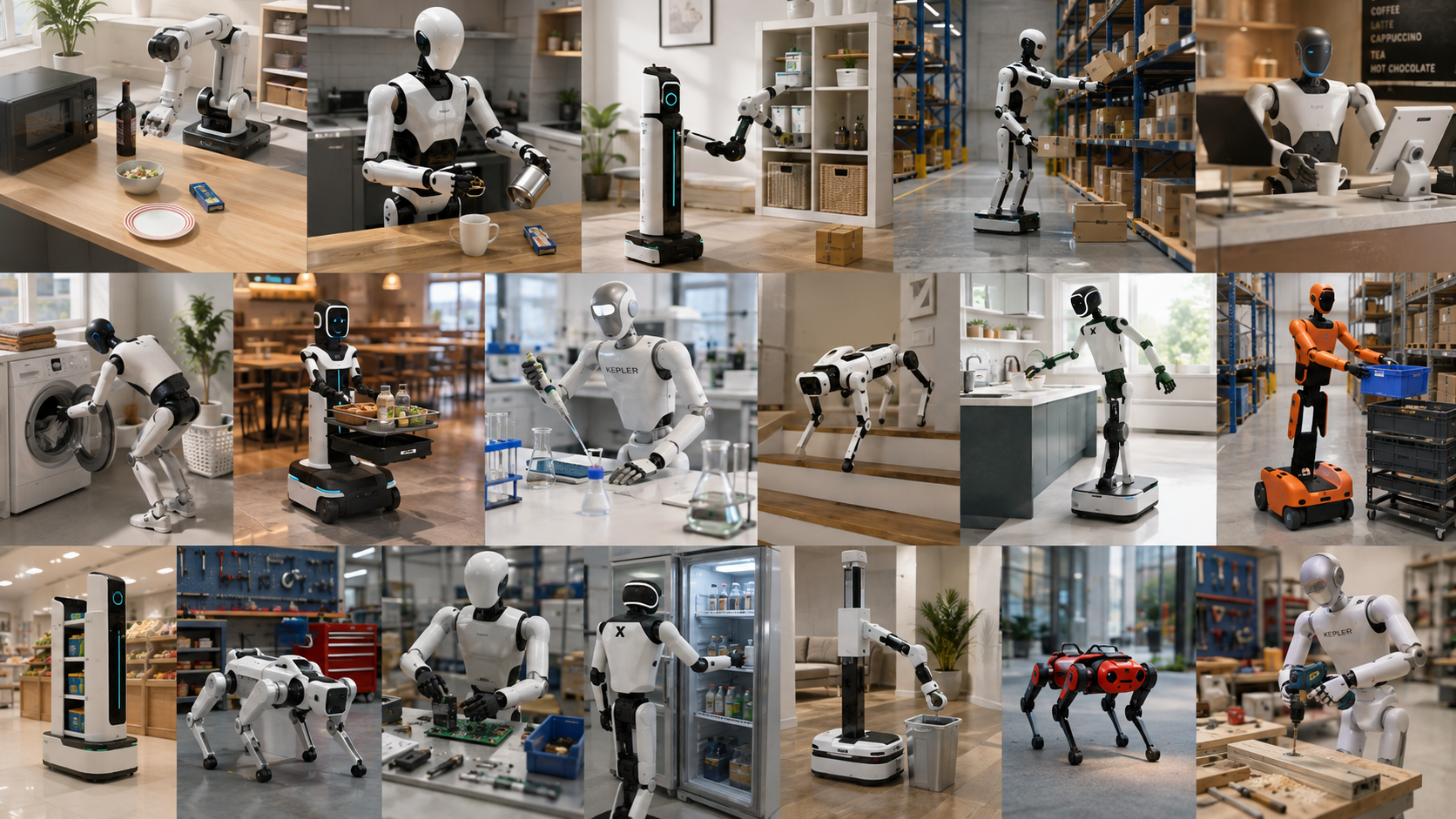
Existing benchmarks lack: ① fine-grained failure diagnosis across vision-language understanding, action representation, and control execution; ② unified capability-level In-distribution (ID)/Out-of-distribution (OOD) analysis; ③ realistic combinatorial testing; and ④ support for model refinement and re-evaluation. VLA-GAUGE is the first systematic framework to jointly evaluate and refine VLA policies, including capability-oriented paired ID/OOD evaluation, progressive combinatorial perturbation evaluation and diagnosis-guided models refinemen
6,300Task Instances
3,089Objects
Full support Full SupportPartial support Partial SupportNo support No Support
Comparison of VLA-GAUGE with existing robot benchmarks
Benchmark
Focus
Tasks
Objects
Fine-grained
ID/OOD
Robustness
Optimization
LIBERO
Knowledge Transfer
130
75
Partial support
No support
No support
No support
Behavior-1K
Long-horizon + Dataset
1,000
9,331
Partial support
No support
No support
No support
COLOSSEUM
Robustness
20
147
Partial support
Partial support
Partial support
Partial support
SimplerEnv
Generalization
8
17
Partial support
Partial support
Partial support
No support
VLA-Test
Robustness
4
74
Partial support
Full support
Partial support
No support
VLABench
Generalization + Long-horizon
100
2,164
Partial support
Partial support
Partial support
No support
VLA-Arena
Robustness
170
122
Partial support
Partial support
Partial support
No support
AGNOSTOS
Generalization
23
112
No support
Full support
No support
No support
LIBERO-X
Robustness
600
96
Partial support
Partial support
Partial support
No support
LIBERO-PRO
Robustness
40
77
Partial support
Full support
Partial support
No support
LIBERO-Plus
Robustness
10,030
911
Partial support
Full support
Partial support
Partial support
VLA-GAUGE
Generalization + Robustness
6,300
3,089
Full support
Full support
Full support
Full support
Benchmark construction
Four modules from raw meshes to evaluation-ready data
Assets, tasks, perturbations and trajectories all come out of one toolchain. Each module below lists its stages, an example of what it emits, and the constraints that matter in practice.
01Object Asset Generation
From external meshes to simulation-ready objects
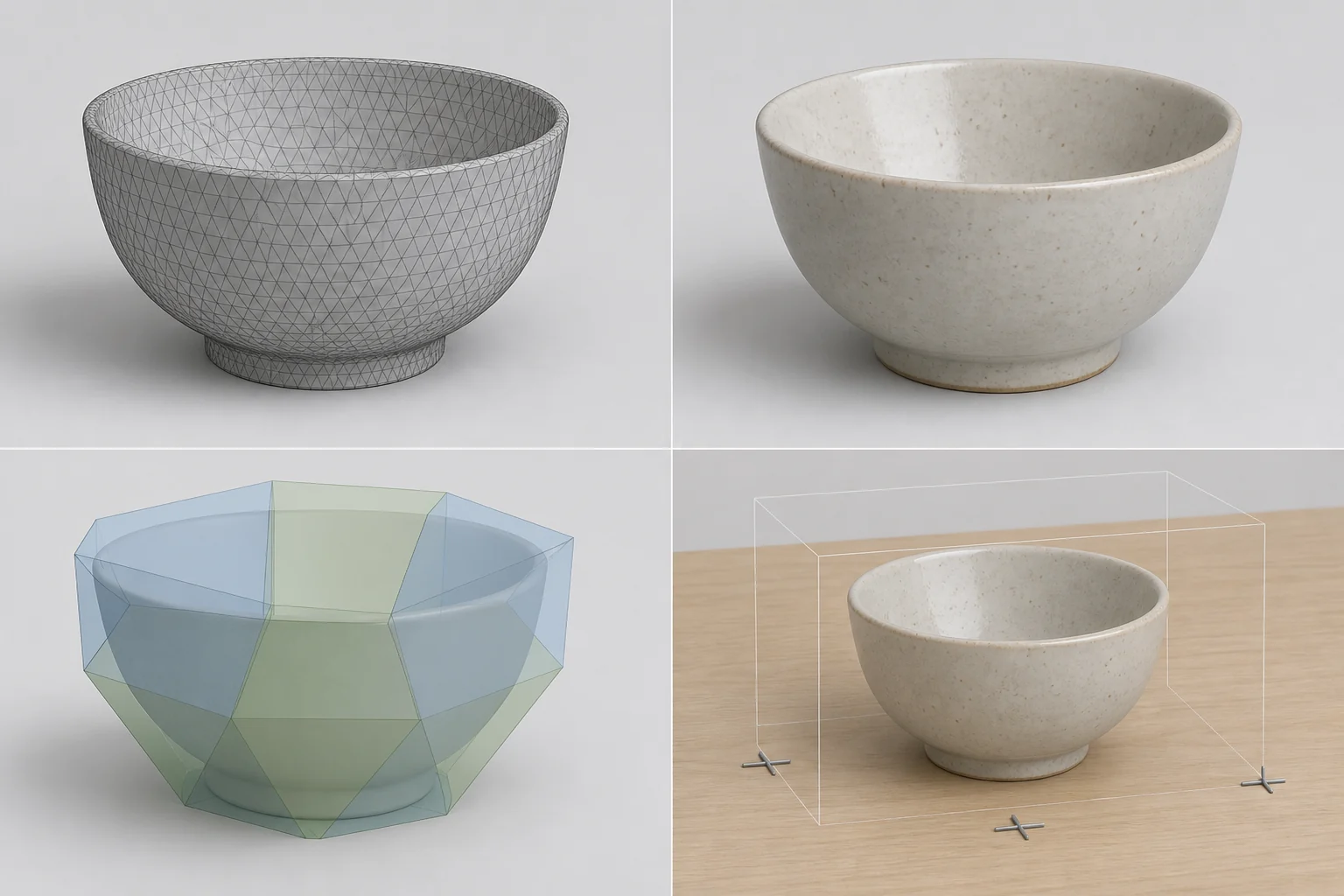
The input is a scanned or downloaded mesh; the output is a registered simulation asset carrying collision geometry and anchor sites.
Input MeshGeometry and textures→NormalizeOne folder per object→Collision MeshConvex decomposition→RegistrationAnchor sites, then the inventory
Raw mesh, textured appearance, convex collision hulls, and the simulation object with anchor sites
Input: one directory per object, holding the geometry, material and texture files.
Collision: convex decomposition is automatic; containers also receive a containment region.
Registration: each asset becomes an object class that scenes and tasks reference by name.
Manual step: scale and origin are often off, so scale and anchor poses need calibration.
02Scene and Task Construction
From the object inventory to executable task definitions
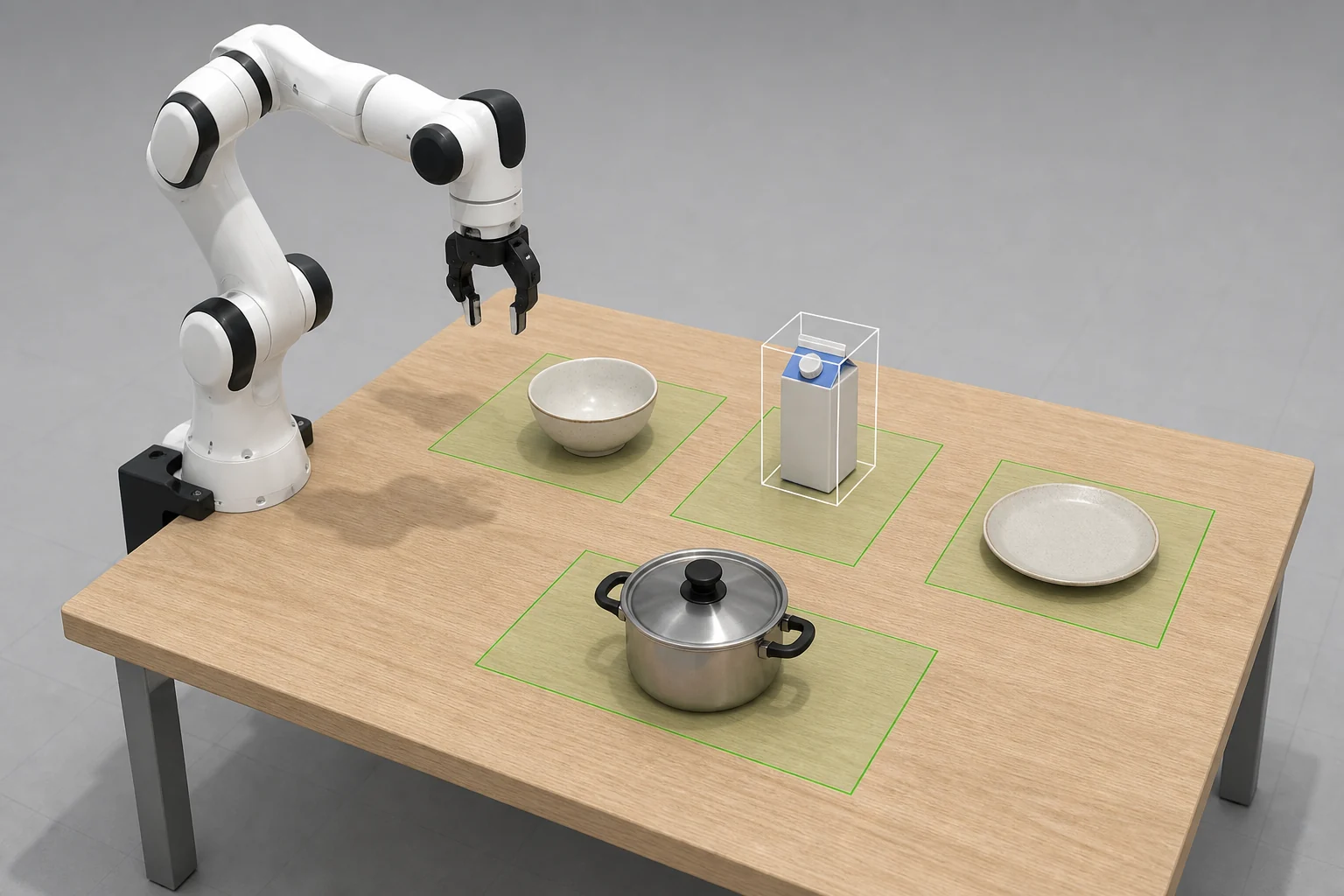
Available objects and scenes are confirmed first, then the scene layout and the task definition are generated, and initial states are sampled for every task.
InventoryObjects and scenes on hand→Scene LayoutObjects and candidate regions→Task DefinitionTarget object and goal state→Initial StatesSampled states per task
The scene layout defines candidate regions on the table (green); the task definition marks the target object (white box)
Scene layout: fixtures and objects are drawn at random, with non-overlapping candidate regions.
Task definition: an LLM reads the scene state and emits the target object and goal state.
Initial states: several states are sampled per task, shared by collection and evaluation.
Manual review: instruction wording, goal states and object poses all need a pass.
03Perturbation Generation
Three families of controllable perturbations, stackable into compositions
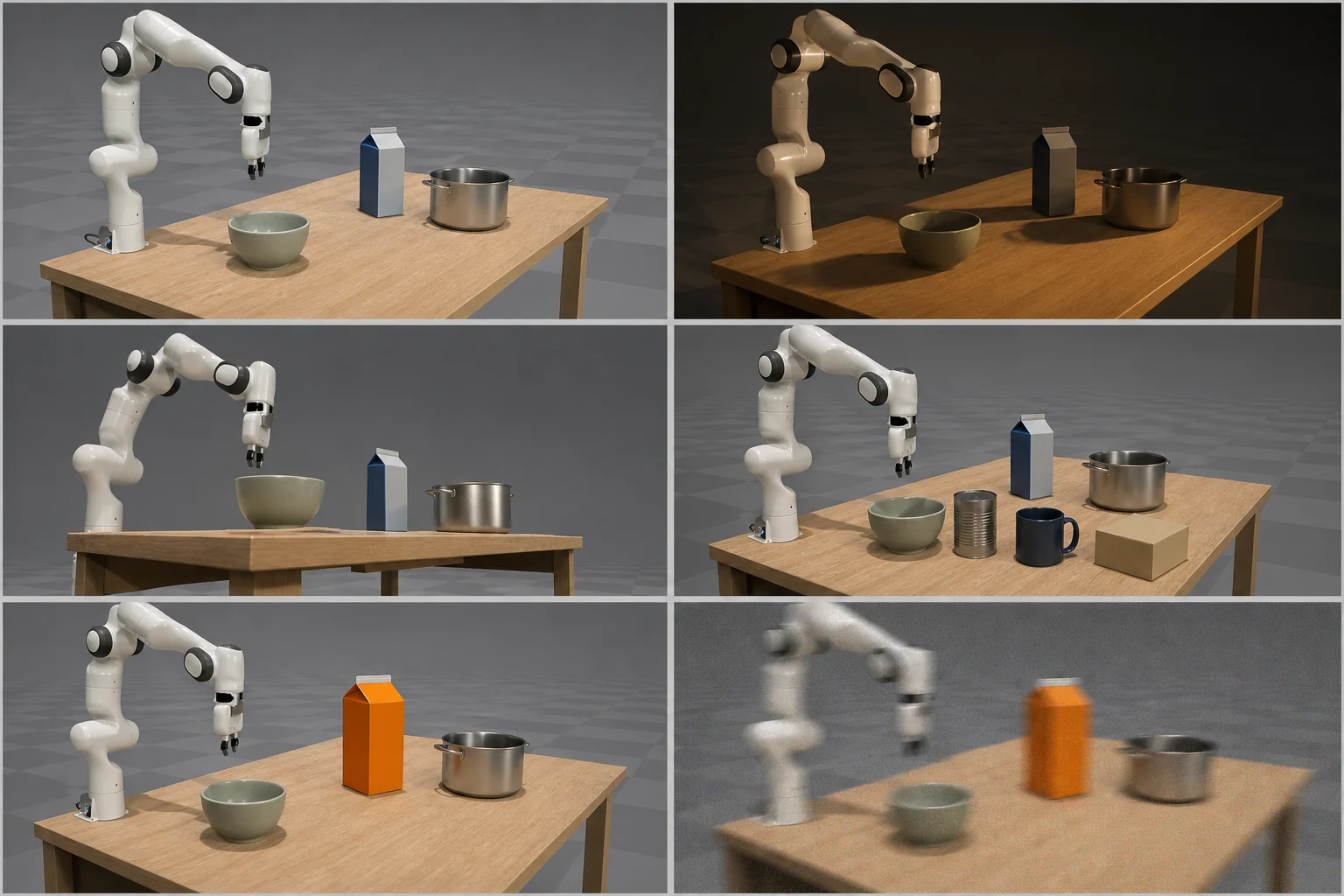
Perturbations are grouped by when they take effect: applied at runtime, baked into the scene, or baked into the object asset.
Runtime-levelCamera, init state, noise, image, action+Scene-levelLight direction, diffuse, specular, shadow+Object-levelSize, orientation, color, distractors→CompositionSeveral factors at once
Six variants of one scene: baseline, lighting, camera viewpoint, distractors, target appearance, and sensor noise
Runtime: camera viewpoint, initial state, sensor noise, image transforms, action noise and dynamic lighting.
Scene: light direction, diffuse, specular and shadow are rewritten into reproducible variants.
Object: size, orientation and color are resampled, and distractors are added or removed.
Combinatorics: counts grow fast once factors stack, so cap the number of combinations.
04Trajectory Replay
Teleoperated collection, batch replay and dataset export
Demonstrations are collected by teleoperation, replayed so observations can be re-rendered and validated, then filtered and packaged into a dataset.
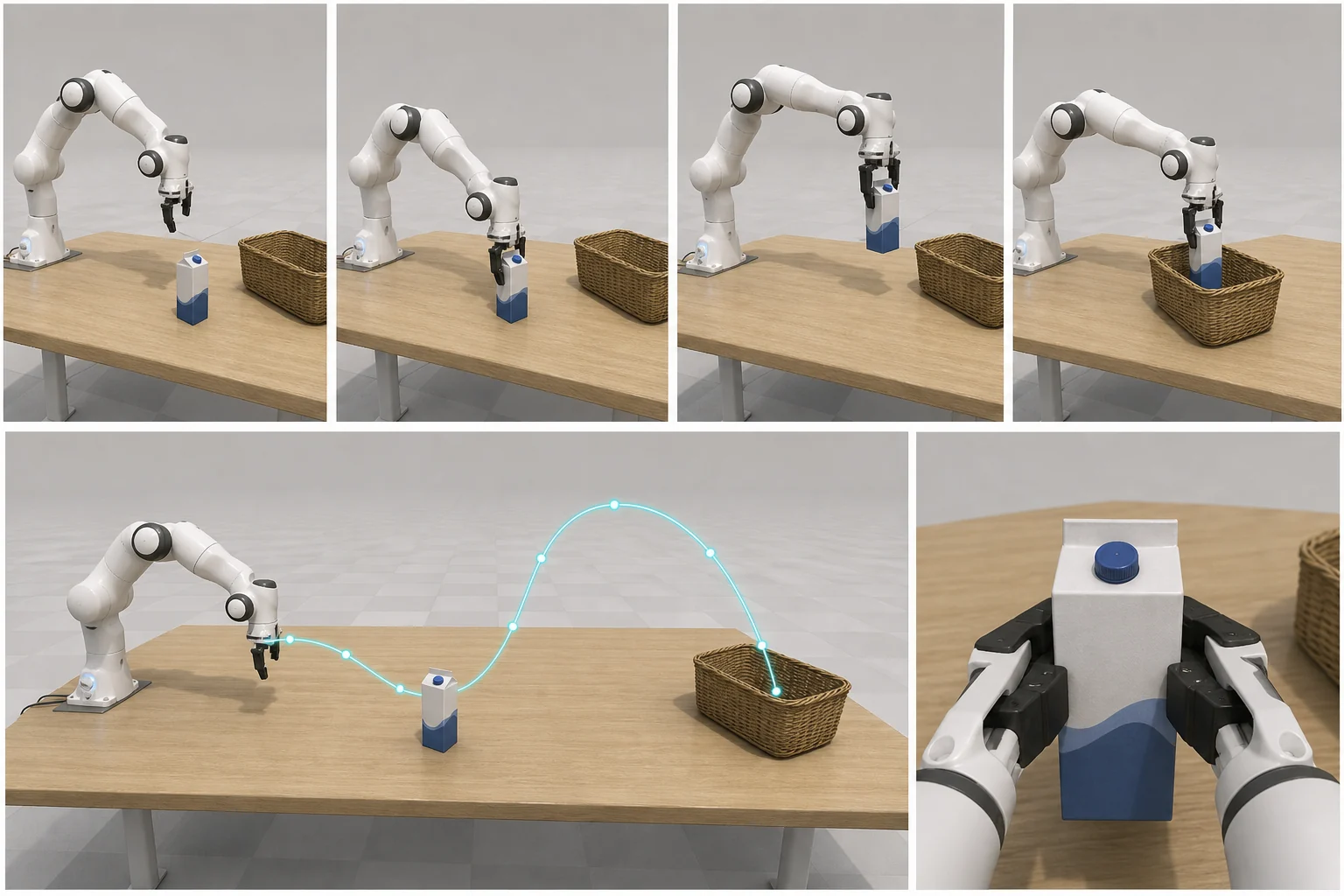
TeleoperationImages, actions, physics state→Replay CheckRe-run actions, re-render views→Frame FilterDrop idle frames and failures→PackagingReady for training
Top: keyframes of one demonstration. Bottom: the end-effector trajectory and the wrist camera view
Collection: keyboard or space-mouse teleoperation, recording images, actions and physics state.
Validation: success must hold ten frames, ten idle frames are appended, final reward above 0.99.
Replay: actions are re-executed to re-render color, depth and end-effector states.
Export: videos for visual inspection; with idle frames removed the data is training-ready.
Leaderboards
Three evaluation views of model reliability
Compare competitive LIBERO VLA models across zero-shot generalization, single-factor sensitivity, and combinatorial perturbation robustness.
1 / 3
Zero-Shot Generalization Leaderboard
Zero-Shot Score (ZS) for every model across the six capability axes: the mean performance over the ID and OOD tasks within each suite. Switch views to split each score into its in-domain and out-of-domain components, or to read the gap between them directly. Models are divided into small/large scale groups using a 5B-parameter cutoff.
12 entries
Values are overall ZS scores across six capability axes (higher is better). Rows are ranked by average ZS in descending order.
Zero-shot generalization of 12 VLA models across six capability axes, shown as Overall.
Rank
1
π0.53BM — Mixed action space
60.0
57.8
61.8
47.6
72.7
41.8
96.9
57.0
2
DeepThinkVLA2.9BD — Discrete action space
39.1
39.6
37.8
21.8
33.2
29.8
97.0
33.6
3
Evo-10.77BC — Continuous action space
30.2
28.0
30.7
8.0
28.2
23.6
94.8
24.8
4
OpenVLA-OFT7BC — Continuous action space
38.2
10.2
36.4
16.9
22.7
21.3
97.1
24.3
5
UniVLA9BD — Discrete action spaceHist. — uses observation or action history
29.3
18.7
23.6
10.2
35.9
23.6
95.2
23.6
6
X-VLA0.9BC — Continuous action space
17.3
14.7
9.8
22.7
37.3
35.6
98.1
22.9
7
CronusVLA7BC — Continuous action spaceHist. — uses observation or action history
24.4
28.9
29.3
8.4
18.2
22.7
97.0
22.0
8
RIPT-VLA7BC — Continuous action space
30.2
6.7
28.4
5.3
15.3
23.1
97.5
18.2
9
GR00T1.53BC — Continuous action spaceHist. — uses observation or action history
15.1
16.0
17.3
4.9
14.5
17.3
93.9
14.2
10
VLA-Adapter-Pro0.5BC — Continuous action space
16.4
14.7
7.6
6.2
10.5
19.6
98.5
12.5
11
SimpleVLA-RL7BD — Discrete action space
11.1
2.2
8.0
2.2
13.6
11.1
99.1
8.0
12
Nora3BD — Discrete action space
11.1
9.3
8.4
2.2
6.8
1.8
87.9
6.6
1
π0.53BM — Mixed action space
57.0
Vis.
60.0
Sem.
57.8
CW
61.8
Spa.
47.6
Act.
72.7
Comp.
41.8
2
DeepThinkVLA2.9BD — Discrete action space
33.6
Vis.
39.1
Sem.
39.6
CW
37.8
Spa.
21.8
Act.
33.2
Comp.
29.8
3
Evo-10.77BC — Continuous action space
24.8
Vis.
30.2
Sem.
28.0
CW
30.7
Spa.
8.0
Act.
28.2
Comp.
23.6
4
OpenVLA-OFT7BC — Continuous action space
24.3
Vis.
38.2
Sem.
10.2
CW
36.4
Spa.
16.9
Act.
22.7
Comp.
21.3
5
UniVLA9BD — Discrete action spaceHist. — uses observation or action history
23.6
Vis.
29.3
Sem.
18.7
CW
23.6
Spa.
10.2
Act.
35.9
Comp.
23.6
6
X-VLA0.9BC — Continuous action space
22.9
Vis.
17.3
Sem.
14.7
CW
9.8
Spa.
22.7
Act.
37.3
Comp.
35.6
7
CronusVLA7BC — Continuous action spaceHist. — uses observation or action history
22.0
Vis.
24.4
Sem.
28.9
CW
29.3
Spa.
8.4
Act.
18.2
Comp.
22.7
8
RIPT-VLA7BC — Continuous action space
18.2
Vis.
30.2
Sem.
6.7
CW
28.4
Spa.
5.3
Act.
15.3
Comp.
23.1
9
GR00T1.53BC — Continuous action spaceHist. — uses observation or action history
14.2
Vis.
15.1
Sem.
16.0
CW
17.3
Spa.
4.9
Act.
14.5
Comp.
17.3
10
VLA-Adapter-Pro0.5BC — Continuous action space
12.5
Vis.
16.4
Sem.
14.7
CW
7.6
Spa.
6.2
Act.
10.5
Comp.
19.6
11
SimpleVLA-RL7BD — Discrete action space
8.0
Vis.
11.1
Sem.
2.2
CW
8.0
Spa.
2.2
Act.
13.6
Comp.
11.1
12
Nora3BD — Discrete action space
6.6
Vis.
11.1
Sem.
9.3
CW
8.4
Spa.
2.2
Act.
6.8
Comp.
1.8
00.0Best00.0Secondcompared within each row
ID and OOD scenarios are not evenly distributed across capabilities, so the overall score is a weighted combination of the two columns rather than their arithmetic mean.
Join the benchmark
Submit a model for official evaluation
Share the public Hugging Face repository containing your VLA model weights and loading instructions. The evaluation team downloads the model, runs VLA-GAUGE, and updates the verified leaderboard.
A readable repository. Weights must sit in a public repository. Gated repositories are accepted, but access has to be approved before the run can start.
Instructions we can follow. Say which checkpoint to load and list any dependency the standard setup does not cover.
Details for the table. Parameter count, action space, and whether the policy conditions on history — these place the model in the leaderboard groups.
A contact address. The team writes to you if the model fails to load or a result needs confirming.
↗No weights are uploaded through this website.
Experimental findings
From aggregate score to failure mechanism
Each analysis presents its research question and key finding alongside the corresponding figure and representative rollout videos.
✦RQ1 (Overall Zero-Shot Generalization Performance):What is the overall zero-shot generalization performance of existing VLA models?
Key evidence supporting the findings
22.3%Mean overall ZS
6.6–57.0%ZS range across 12 models
32.9% → 7.2%Mean ID-to-OOD ZS
71/72Model-capability degraded
32OOD entries scoring 0%
✦RQ2 (Zero-Shot Performance Distribution and Capability Bottlenecks):What zero-shot performance distribution and capability bottlenecks do existing VLA models exhibit across VLA-GAUGE's six capability dimensions?
Key evidence supporting the findings
13.0%The Lowest overall ZS in spatial reasoning
8/12The lowest or joint-lowest score in spatial reasoning
16.0%The Lowest ID ZS in spatial reasoning
2.8%The Lowest OOD ZS in compositional capability
9/12the OOD scoring 0% in compositional capability
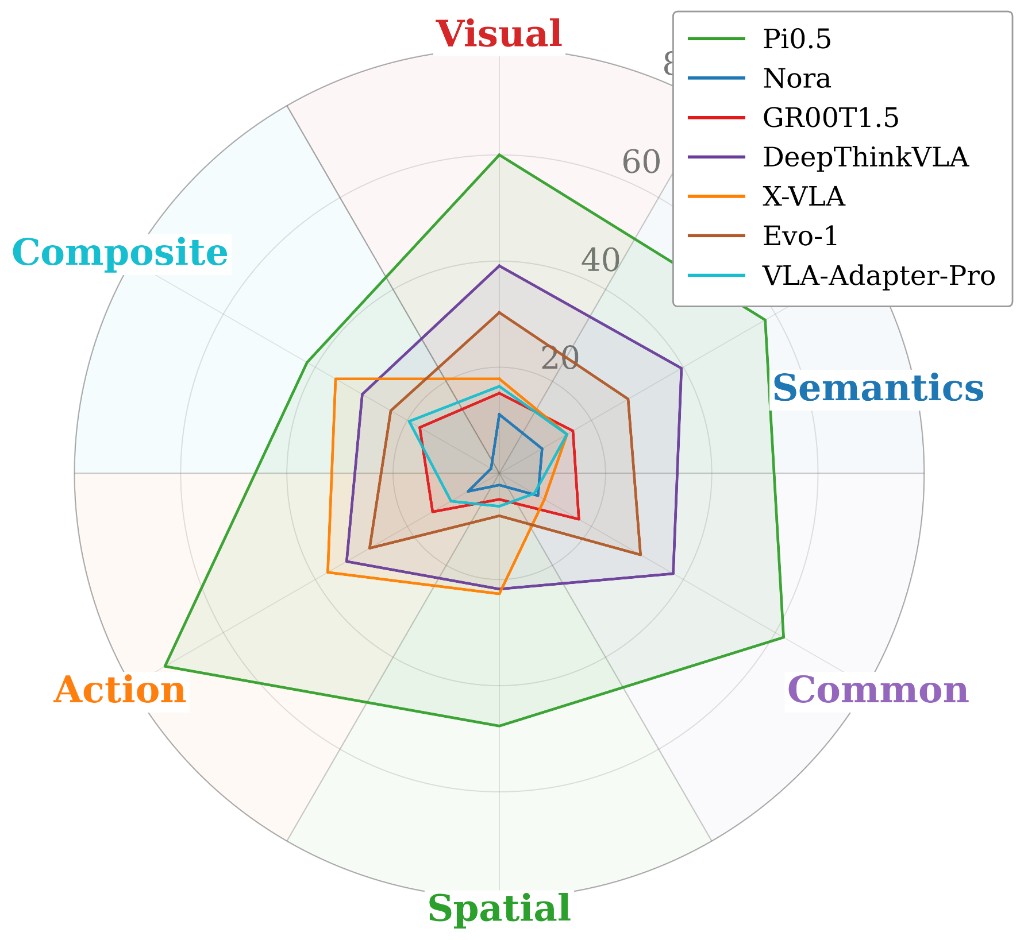
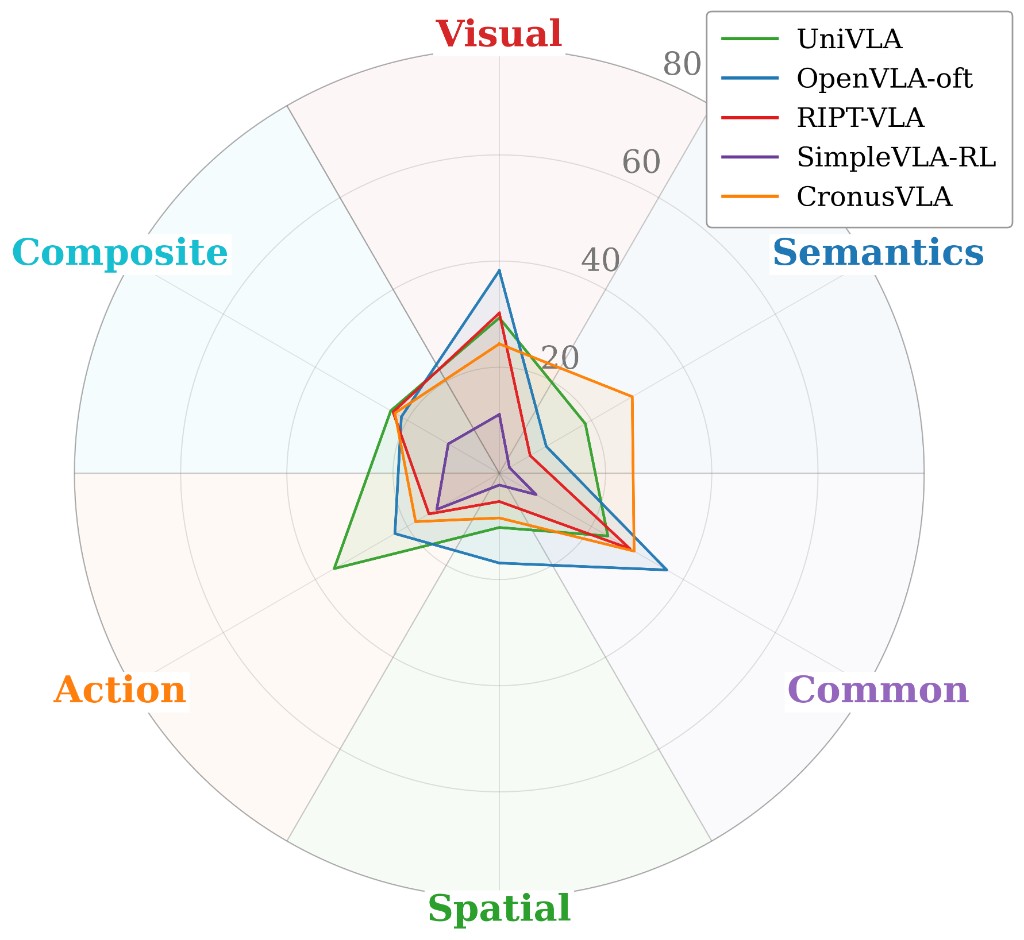
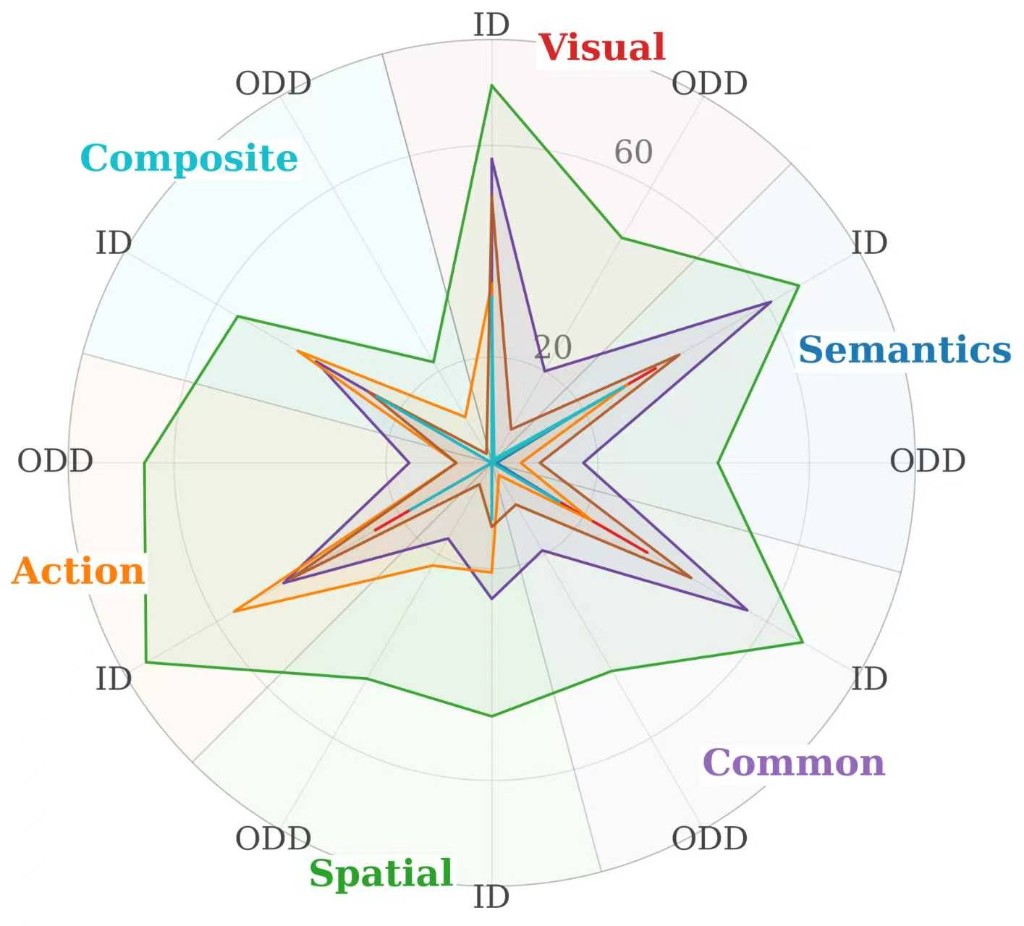
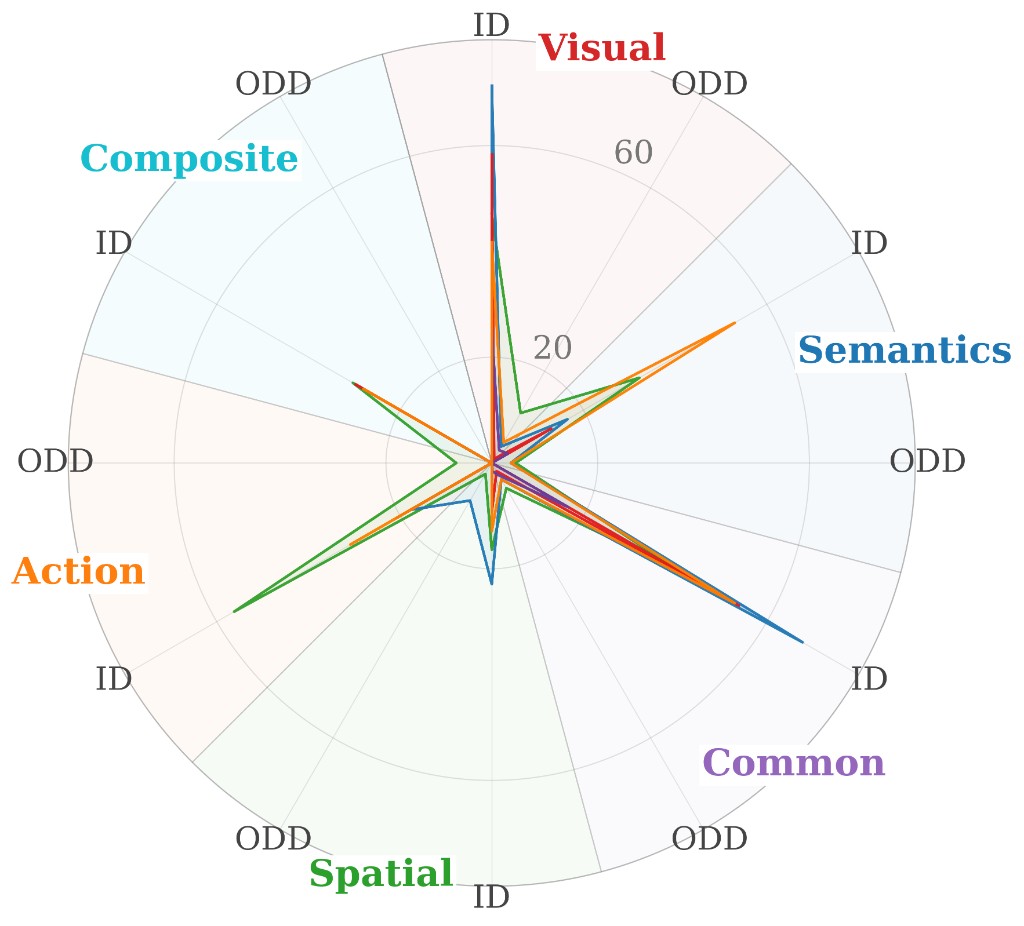
Radar distributions of VLA models across six capability dimensions
4 charts
(a)-(b) Overall ZS and (c)-(d) ID and OOD ZS, both grouped by model scale. Spatial consistently dips inward, while Composite OOD collapses toward the center for most models. Across the evaluated models, parameter scale does not reliably predict zero-shot generalization.
(a) Small Models: Overall ZS
(b) Large Models: Overall ZS
(c) Small Models: ID vs. OOD
(d) Large Models: ID vs. OOD
π0.5 · strongest rollout on each axis
6 axes
Each capability axis presents a 2×2 grid of selected successful rollouts, with each clip captioned by its task instruction. Due to layout constraints, some captions under Semantic Grounding, Common Sense and World Knowledge, and Compositional Capability show standard task instructions; the exact scenario-specific instructions are provided in the corresponding files.
Visual Perception
Pick up the mahjong of 5 pin
Put the wine in the basket
Put the wine in the basket
Put the cookies on the plate
Semantic Grounding
Insert a sunflower in a basket
Put the teapot in the basket
Pick up the mahjong of 9 pin
Pick up the eggplant in basket
Common Sense & World Knowledge
Pick up the queen of hearts
Put the cup in the basket
Pick up the mahjong of 4 sou
Put the car in the basket
Spatial Reasoning
Place the farthest fruit on the plate
Pick the first fruit from left to right and put it in the basket
Pick up wine and place it in the left compartment of caddy
put the mug farthest to the chocolate pudding on plate
Action Reasoning
Open the microwave
Pick the small cube and place it in the basket
Turn off the stove
Close the microwave
Compositional Capability
Put the both animal toys in the basket
Turn on the stove and put the black bowl on it
Put both the butter and the cucumber in the basket
I want to put the yellow book away. Could you place it on top of the microwave and close it?
Perturbation Combinations
From Category to Factor Combination
Each PCC and PFC configuration comprises a deliberately selected combination of perturbation factors and their underlying components. Colors denote each factor's high-level perturbation category.
1 / 2
Perturbation Category Combinations
ControlSpatialVisual
PCC selects representative factors from one, two, or all three perturbation categories.
PCC-1.1
Camera Vertical
PCC-1.2
Clutter Distractor Swap
PCC-1.3
Initstate
PCC-2.1
Camera VerticalClutter Distractor Swap
PCC-2.2
Camera VerticalInitstate
PCC-2.3
Clutter Distractor SwapInitstate
PCC-3.1
Camera VerticalClutter Distractor SwapInitstate
Citation
Cite VLA-GAUGE
If you find VLA-GAUGE useful in your research, please consider citing our work.
Reference
BibTeX
Citation metadata will be published with the VLA-GAUGE paper.